Mocha for Medical practices
Collect patient reviews with consent, and show them anonymously if you like
People looking for a family doctor or a specialist want to know what a practice is like. Mocha collects reviews from your patients with documented consent and, if you like, shows them anonymously on your website.
- Servers in Germany
- Consent with audit log
- No credit card needed
Sound familiar?
Medical practices of every size know these situations from daily work.
Your front desk hears praise every day, but none of it shows on your website. People looking for a new practice see only opening hours and services.
Reviewing a treatment in public says something about a person's health. Many patients stay quiet rather than write under their full name.
Slips of paper in the waiting room or feedback by email cost your team time, and later nobody knows whether or what someone agreed to.
How Mocha solves it
What changes with Mocha.
Consent before every review: wording, version and time are stored and can be exported as a log. Through a personal link, anyone can withdraw, and the review then disappears from your widgets.
Name display your way: in full, first name with initial, initials only or anonymous. With initials or anonymous display, Mocha shows no photo and no job title, and anyone can also hide their own name.
Google voices and practice voices in one place: reviews from your Google Business Profile can be imported into Mocha and appear in your widgets next to the ones from the form, marked “via Google”. Nothing to retype.
A QR code for the front desk and waiting room: as a counter stand, a poster or on a business card. One scan opens the form on a smartphone, and printed codes stay valid even if you change the form later.
Approval before publishing: you decide whether reviews appear right away or only once you have checked them.
What this can look like
A family practice after the appointment
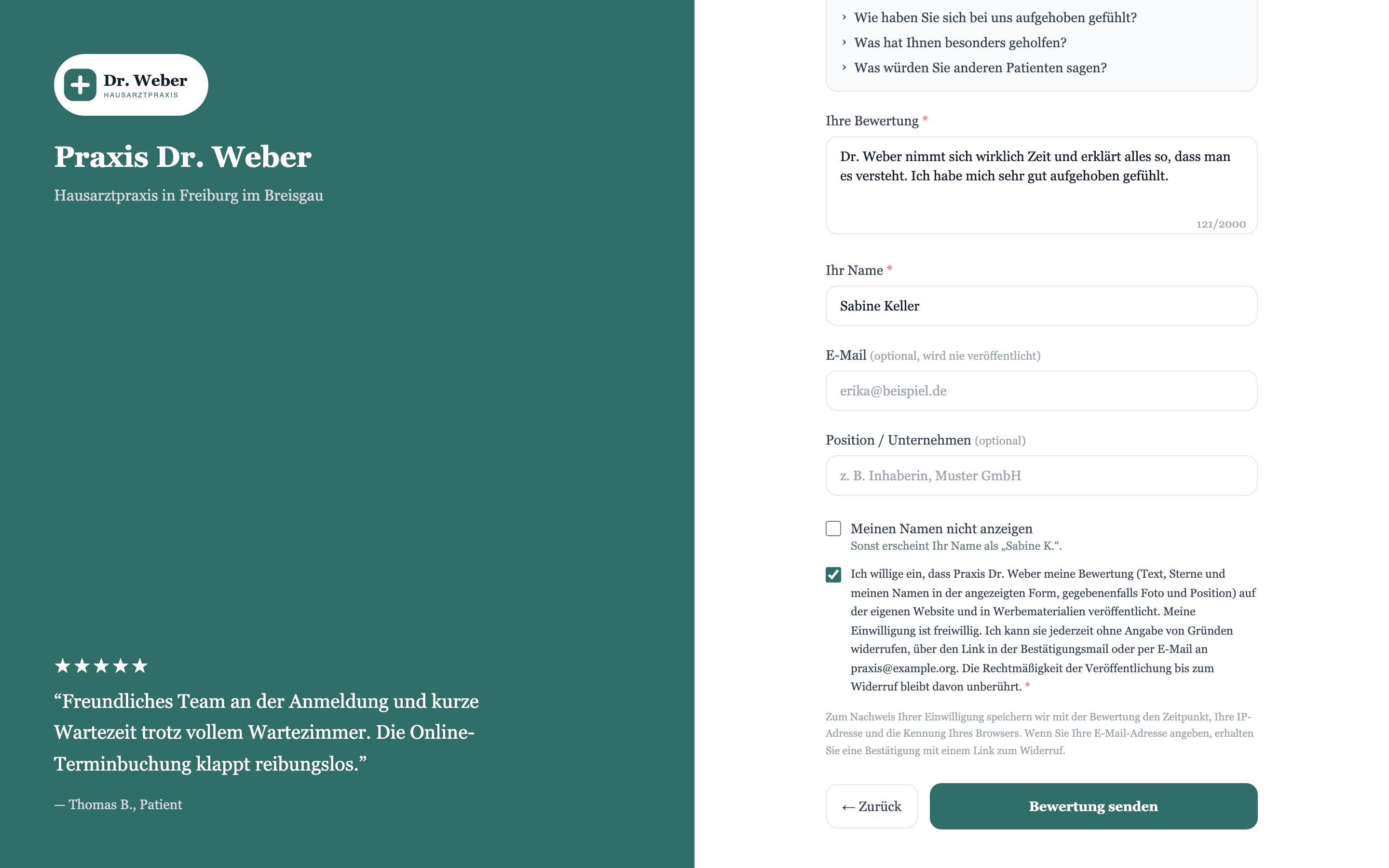
A family practice puts a small stand with a QR code on the front desk. After her appointment, a patient waits a moment for her follow-up appointment, scans the code with her smartphone and writes two sentences about the friendly check-in. Before sending, she confirms her consent. The practice has set name display to initials, so the review appears without her full name and without a photo. The practice manager checks it the next morning and approves it, and then it shows on the website. If the patient wants to take it back later, she can use her personal withdrawal link.
An example for illustration, not a customer case.
Widgets that suit you
One line of code, and approved reviews appear on your website.
Star badge
The star badge shows average rating and review count in one line and sits in your home page header or next to the appointment link.
See the widgetReview wall
The review wall shows approved reviews as cards on a page of your website, with imported Google reviews next to those from the form.
See the widgetSingle review
The single review shows one voice in large type, for example on your “Our team” page, where visitors wonder what the practice is like.
See the widgetWhat you get
- Versioned consent
- Withdrawal by link
- Choose how names appear
- Anonymous display
- QR code for front desk and waiting room
- Google import
- Approval before publishing
- Widgets for your website
Frequently asked questions
How does this fit with confidentiality and professional rules?
Mocha is built so that the review comes from your patients and they explicitly consent before sending it. Whether and how you may use reviews in your public profile is best checked with your medical association or your legal adviser; Mocha is not legal advice.
Can patients review anonymously?
Yes. Set the name display to “Anonymous” or “Initials only”, and neither a photo nor a job title is shown. Anyone can also hide their own name.
How do patients get to the form?
Through a QR code at the front desk or in the waiting room, as a stand, poster or business card, or through a link on your website. One scan opens the form on a smartphone. The code contains only the address of the form, so printed codes stay valid even if you change the form later.
Can I show my Google reviews too?
Yes, reviews from your Google Business Profile can be imported into Mocha and appear next to the reviews from the form in your widgets, marked “via Google”. You can do this by hand in any plan, and in the Pro plan it also runs automatically every day. Google returns only a small selection per request, and Google decides which. Imported reviews have no consent recorded through Mocha; whether you show them is best checked with your legal adviser.
What happens when someone withdraws consent?
The review is archived and no longer appears in any widget. The log still shows when consent was given and when it was withdrawn.
Where is the data stored?
The application and database run on servers in Germany (Hetzner), and photos and videos are stored by the EU provider Bunny.net. Before sending, everyone explicitly consents, and the consent is stored with wording, version and time. For emails and AI features, the content they need goes to service providers in the USA (Resend, Anthropic), and reviewers' names never go to the AI provider; the details are in the privacy policy.
Start with a form that builds in consent from the first step.
Free and without a credit card. Create the form, print the QR code, get going.
Start for free